
Appearance
What is Yapii?
Yapii helps real estate agents turn the people they already know into their next deals.
It keeps all your contacts in one place and works them for you in the background. Its AI assistant, Claire, follows up with your leads by text, email and phone. Yapii also sends your homeowners a monthly email about their home's value and hands leads back to you the moment they're ready to talk.
What Yapii does for you
- Keeps your database in one place. Import a spreadsheet or connect Follow Up Boss, and every contact, note, text and email lives on one timeline.
- Follows up so you don't have to. Claire reaches out to new leads quickly, keeps conversations going, and books appointments when a lead confirms a time.
- Tells you who to call today. Every contact gets an IQ score from 0 to 100 showing how worth working they are right now, and your Dashboard puts the best ones at the top.
- Keeps you in front of homeowners. Each homeowner gets a monthly email with an estimate of their home's value and a link to a personal dashboard for their home.
- Hands you the hot ones. When a lead is ready, asks for a person, or books a meeting, Claire creates a hand-off so you can take it from there.
- Keeps you compliant. Yapii checks consent, opt-outs and legal calling hours before every text and call, so you don't have to remember the rules.
How a lead moves through Yapii
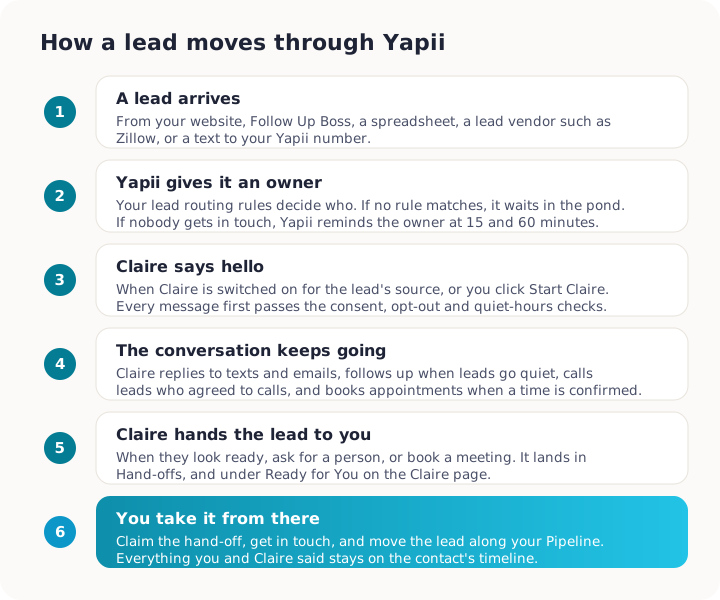
Each step is covered in more detail in How new leads arrive, Meet Claire and Hand-offs.
The main parts of Yapii
| Part | What it's for |
|---|---|
| Dashboard | Your starting point each morning: who to call, what's due, what Claire did. |
| Contacts | Everyone in your database, with search, filters, tags and each person's full history. |
| Claire | Your AI assistant's conversations, drafts waiting for approval, and her settings. |
| Inbox | Texts, emails and calls with your contacts, in one place. |
| Tasks, Pipeline, Appointments | Your to-do list, the stages your contacts move through, and your calendar. |
| Team | Your teammates, their roles, and how the team is doing (team workspaces). |
| Settings | Workspace setup for owners and admins: email, phone, billing, integrations. |
Finding your way around walks through the screen.
A day with Yapii
- You open Yapii and land on your Dashboard. It shows today's call list, overdue tasks, and what Claire did overnight.
- Overnight, a new lead filled in a form on your website. Claire texted them within minutes. They replied and asked to see a house on Saturday, so Claire booked it and sent you a hand-off.
- You claim the hand-off, call the lead, and move them to the next stage in your Pipeline.
- A homeowner opened their monthly home value email, looked at their dashboard and asked to be contacted. Claire has started a friendly conversation with them.
- Before logging off, you approve two messages Claire drafted for your hottest leads.
Who can do what
Your role decides what you can change. Most day-to-day work is open to everyone. Workspace setup is limited to owners and admins.
| You are... | You can... |
|---|---|
| Member (agent) | Work your contacts, use the Inbox and Claire, manage your tasks and appointments. |
| Manager | Everything a member can, plus team dashboards and leaderboards. |
| Admin | Everything except billing and ownership: Settings, integrations, inviting people. |
| Owner | Everything, including billing, transferring ownership and deleting the workspace. |
More in Team and roles.
Where to next
- Your first day: sign in, set up the basics, and get your contacts in.
- Meet Claire: how your AI assistant works and how to stay in control.
- Glossary: the words you'll see in Yapii, explained.