
Appearance
Working with contacts
Your contacts are everyone in your database: sellers, buyers, leads, past clients and referral partners. This page covers finding, adding, organizing and removing them.
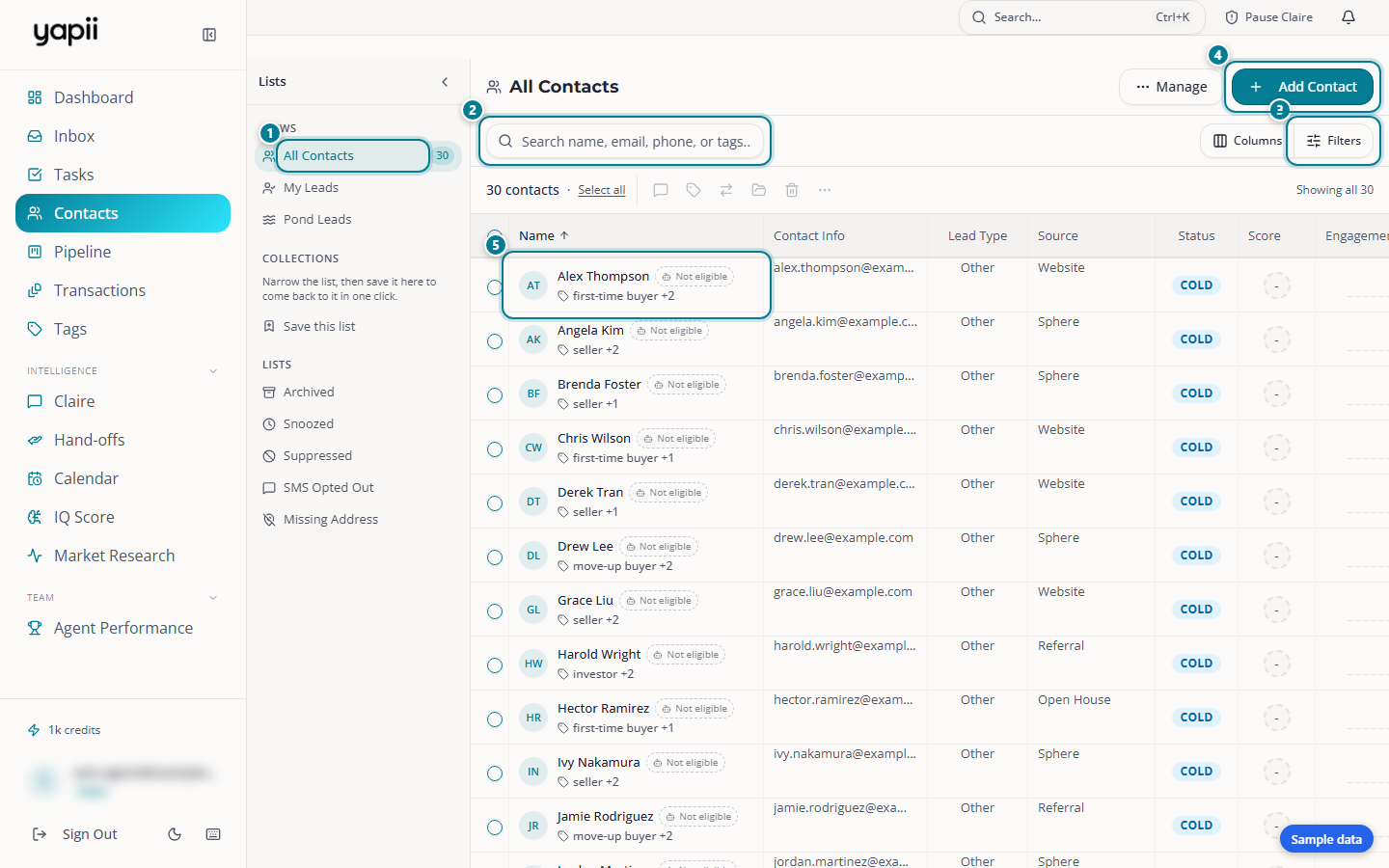
- Views and lists: everyone, your own leads, and lists such as Archived and Suppressed.
- Search: by name, email, phone or tag.
- Filters and columns: narrow the list, and choose which columns show.
- Add Contact
- A contact: click a name to open their page.
The Contacts page
Open Contacts from the sidebar. You'll see:
- The Lists panel on the left. Hide it with the arrow at its top.
- Views: All Contacts (everyone you can see), My Leads (contacts assigned to you) and Pond Leads (unassigned leads anyone on the team can claim).
- Collections: narrow the list, then click Save this list to come back to it in one click.
- Lists: Archived, Snoozed, Suppressed, SMS Opted Out and Missing Address.
- A search box. Search by name, email, phone number or tag.
- Filters. Narrow the list by lead type, source, stage, tags, city, price range, when you last called, texted or emailed, consent status, and more. Your filters stay in the page address, so the back button brings them back.
- Columns. Choose which columns to show, such as IQ score, last email opened or street address.
Scroll down and more contacts load automatically.
Adding a contact
- On the Contacts page, click Add Contact.
- Enter at least a first or last name. Add an email, phone number, address and tags if you have them.
- Save.
If someone you can already see has the same email address, Yapii tells you and offers to open the existing contact instead.
To add many contacts at once, see Importing contacts.
A contact's page
Click any contact to open their page. It has three parts (on a phone, three tabs):
- Details: phone, email, address, source, who it's assigned to, tags and stage.
- Activity: the timeline of everything that has happened: notes, texts, emails, calls, stage changes and Claire's conversations.
- Intelligence: extra insight such as the IQ score, home value, seller readiness and consent status.
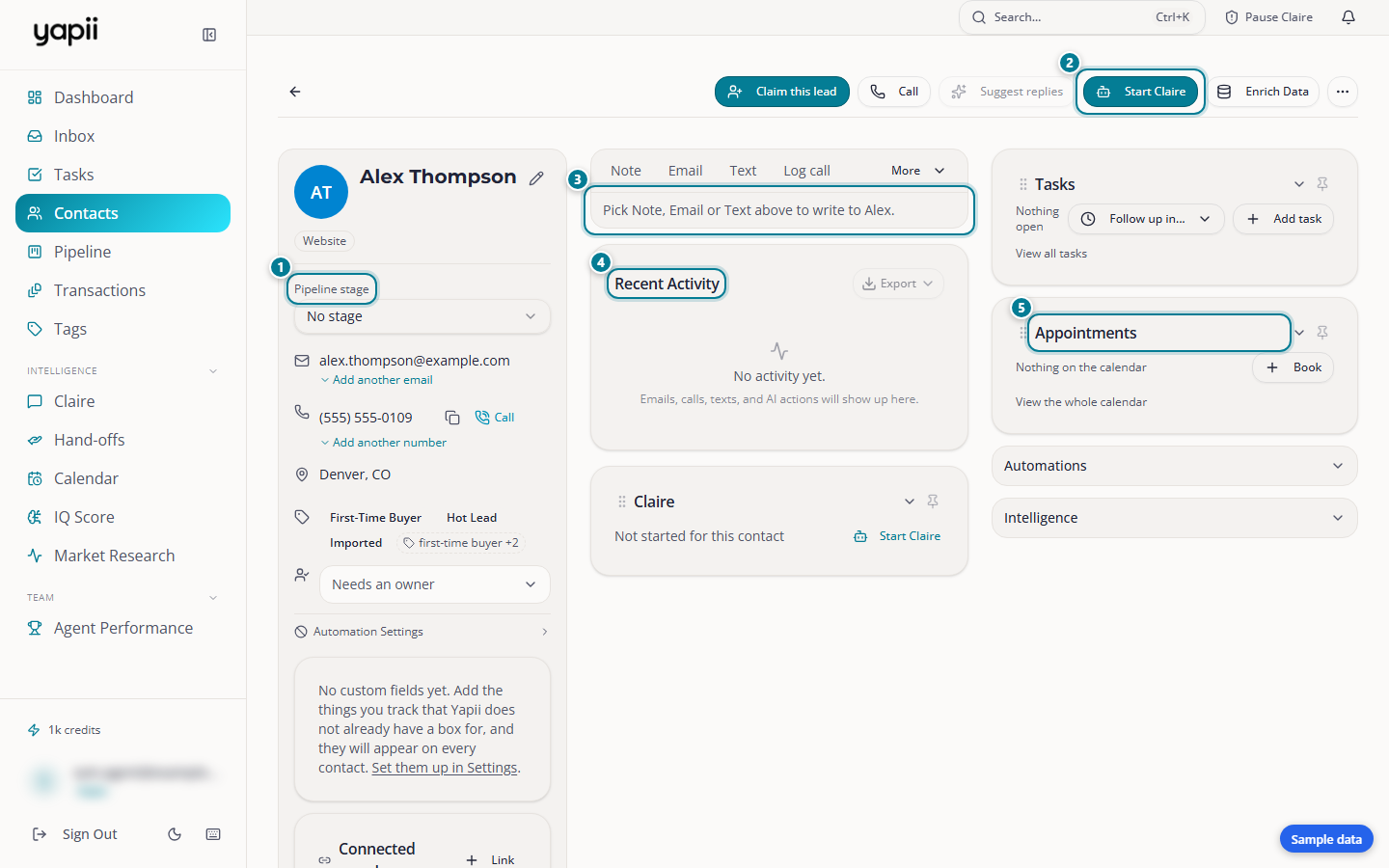
- Their details: pipeline stage, email, phone, location and tags.
- Start Claire: start Claire's conversation with this contact.
- Write to them: add a note, or send an email or a text.
- Recent activity: every email, call, text and note, newest first.
- Tasks and appointments
From the top of the page you can:
- Call the contact, or have Claire call them.
- Email or Text them, or add a Note. Type @ and a teammate's name in a note to notify them.
- Assign the contact to someone (owners, admins and managers).
- Start Claire on the contact (see Meet Claire).
- Archive the contact.
The side panels hold the contact's tasks, appointments, sequences and Claire's plan.
Organizing contacts
Tags
Tags are labels such as "past client", "open house 5/12" or "investor". Add them on a contact's page, in bulk from the Contacts list, or during an import.
The Tags page lists every tag with how many contacts use it. From there you can rename, merge or delete tags.
Renaming or deleting a tag changes it everywhere
Renaming, merging or deleting a tag updates every contact in the workspace that has it, including contacts you can't see.
Lead type and stage
- Lead type is seller, buyer, agent or other. It decides which emails and Claire conversations fit the contact.
- Stage is where the contact is in your Pipeline.
Custom fields
Owners, admins and managers can add your own fields, such as "school district", in Settings, under Custom Fields. They then appear on each contact's page and as filters.
The IQ score
Every contact has an IQ score from 0 to 100: Yapii's estimate of how worth working that contact is right now. It considers:
- where the lead came from;
- how recently you were in touch;
- follow-ups coming due;
- property value and equity;
- tags such as hot or VIP;
- what the contact has said.
The score is recalculated whenever the contact changes, and again overnight. Contacts that reach 80 are tagged Hot automatically. The IQ page shows your top opportunities and how "warm" your whole database is.
Treat the score as a daily guide to who to call first, not a permanent grade.
Working with many contacts at once
Tick the boxes next to contacts, or use select all matching to pick every contact that matches your filters, then choose an action:
- Assign to a teammate (owners, admins, managers).
- Tag, change stage, or add to a segment.
- Enroll in a sequence.
- Start Claire on them.
- Archive them. You get a short Undo window.
- Export to a spreadsheet (owners and admins).
Deleting and restoring contacts
In Yapii, deleting a contact archives it:
- Open the contact and choose Archive.
- Pick a reason (duplicate, wrong number, opted out, not a lead, other).
Archived contacts disappear from your lists and from all outreach, but nothing is erased.
To restore a contact: on the Contacts page, open Archived in the Lists panel, select the contact and restore it.
Erasing is permanent
Owners and admins can permanently erase a contact's data, for example when a person asks to be forgotten. This removes the contact and their history for good and can't be undone.
Duplicates
- Owners and admins can click Find duplicates on the Contacts page. Yapii groups contacts with the same email, the same phone number or very similar names, and you choose which details to keep when merging.
- Smart Dedupe reviews duplicate suggestions Yapii finds automatically in the background.
Who sees which contacts
This depends on a workspace setting called contact visibility:
| Setting | What people see |
|---|---|
| Everyone keeps their own contacts (default) | Each person sees only the contacts they added themselves. This includes owners and admins. |
| Agents see the contacts assigned to them | Owners, admins and managers see everything. Each agent sees the contacts assigned to them. |
Owners and admins
Change this in Settings, under CRM & Team Access. Switching to the assignment setting can leave agents with an empty list until contacts are assigned, so plan the switch.
Troubleshooting
I can't find a contact I know is there.
- Clear your filters and search.
- Check the Archived list in the Lists panel.
- Remember the visibility setting: a teammate's contact may not be visible to you.
Yapii says the email already exists, but I can't see that contact. The duplicate check only looks at contacts you can see. Ask a teammate or your admin.
The IQ score looks wrong. It changes daily with new activity. Open the contact to see the top reasons behind the score.